IN5700: Fog and Cloud Computing
Master's course on designing systems across the edge-fog-cloud continuum. A group project in OMNeT++ comparing a cloud-based and a fog-based smart garbage collection system, a presentation of the research paper Fogify: A Fog Computing Emulation Framework, and an individual OMNeT++ assignment on loss and retransmission, and the official OMNeT++ TicToc tutorial.
IN5700: Fog and Cloud Computing at the University of Oslo, autumn 2026. The course covers how to specify, design, implement and analyse fog computing systems and applications, and how fog relates to cloud and near-far computing. Topics include the fog programming model, security, offloading, software-defined networking (SDN), load balancing, communication, containers and orchestration, and application areas like machine learning and healthcare. A recurring question is which approach fits a given problem best, and how to measure and analyse the performance of the result.
This is the course closest to the direction I want to work in, and it is where my Zero-Trust Continuum project comes from.
The page has four parts:
| # | Work | Status |
|---|---|---|
| 1 | Group project: smart garbage collection | Completed |
| 2 | Paper presentation: Fogify | Presented 21 October 2026 |
| 3 | Individual project: FogCloudProject | Completed |
| 4 | Tutorial: the OMNeT++ TicToc tutorial | Completed |
Group project: Smart garbage collection with fog and cloud computing
Status: completed. Group 10, three members. Built in OMNeT++ 6.4 with INET 4.7. This is the work I am proudest of in this course. My part: I set up the repository and built most of the simulation, including the shared message layer, the message flow for all three solutions, the moving truck, the canvas, the link model, the videos and the report.
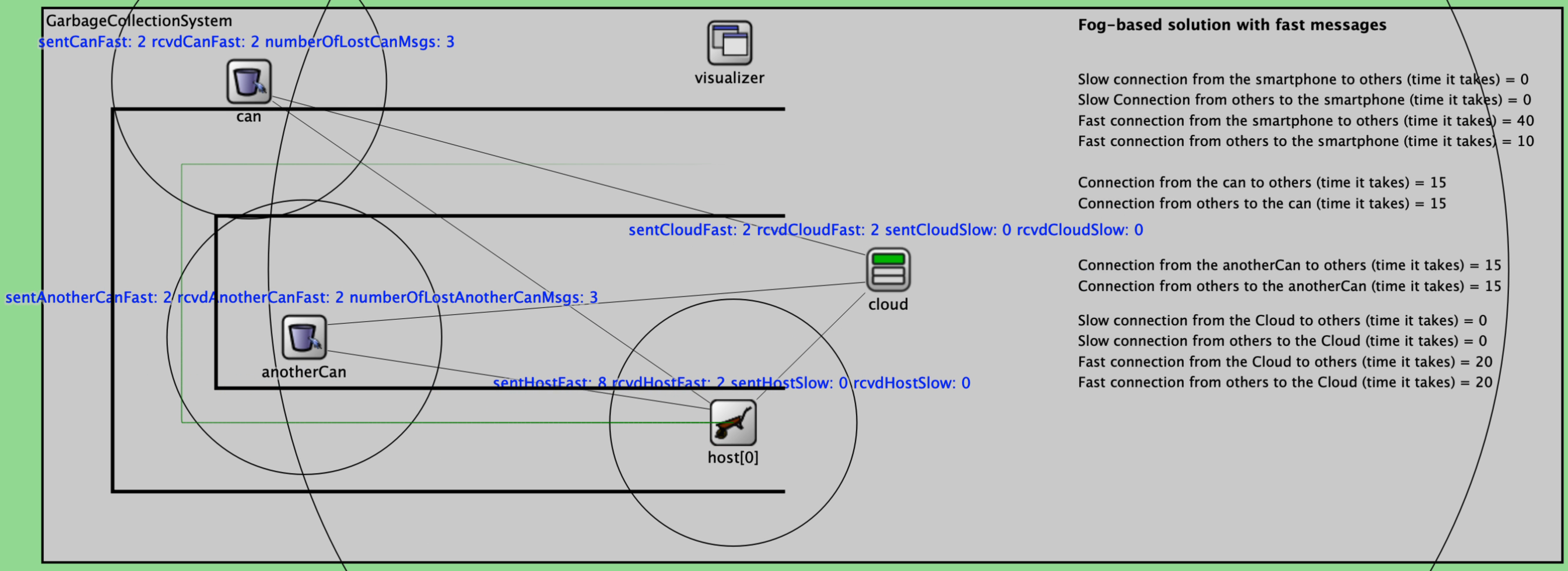
A garbage truck drives along three streets. The driver’s smartphone asks two smart garbage cans whether they are full, and if a can is full, the central garbage site in the cloud is told so the can gets emptied. The point of the project is to compare two architectures for the same job and measure the difference. The screenshots below are from our own simulation runs. Click any picture to see it in full size.
At a glance
- What: a smart garbage collection system simulated in OMNeT++, with three selectable solutions.
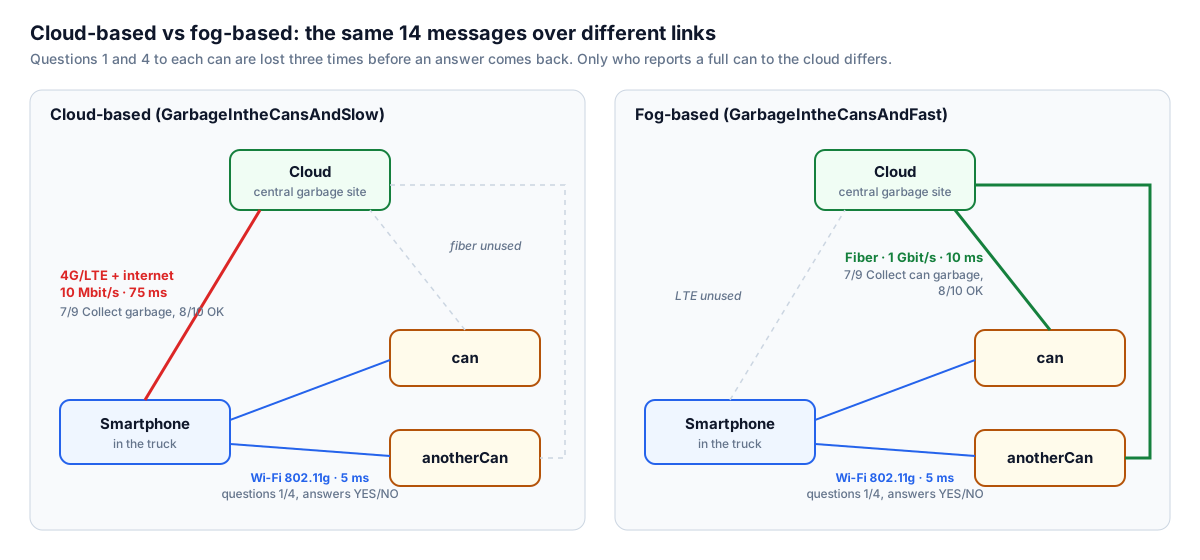
- Cloud-based (
GarbageIntheCansAndSlow): the smartphone tells the cloud over a slow 4G/LTE link. - Fog-based (
GarbageIntheCansAndFast): each full can tells the cloud itself over fast fiber. - No garbage (
NoGarbageInTheCans): a baseline where the cans are empty and the cloud is never contacted. - The twist: the first three questions to each can are deliberately lost, so the smartphone has to detect every loss with a timeout and ask again.
- Key result: the fog-based design spent about 3.9 times less time on the network when sending, and the real bottleneck turned out to be the retransmission timeout, not the links.
Two architectures, same messages
One run, step by step
- At 4 s the smartphone’s timer fires, and it sends “1-Is the can full?” to the first can.
- The can drops the first three questions. The smartphone asks again every second (4, 5, 6 and 7 s).
- The fourth question is answered with “3-YES”, or “2-NO” in the no garbage solution.
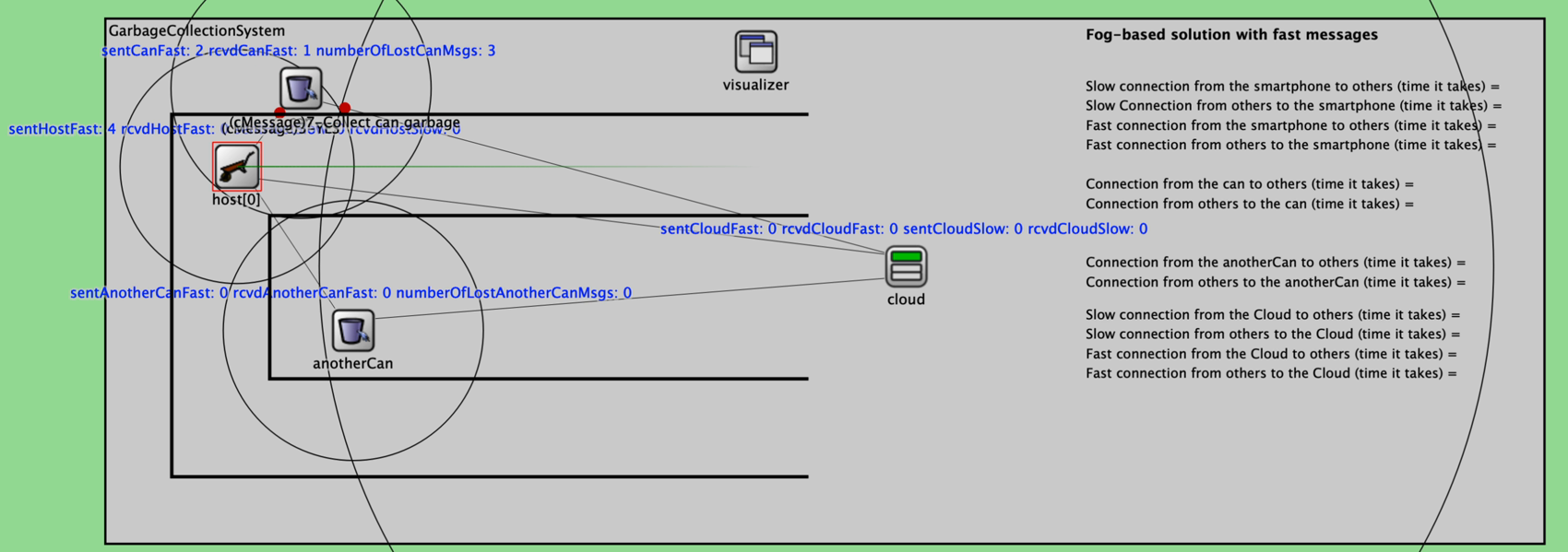
- On YES, the smartphone sends “7-Collect garbage” over LTE (cloud-based), or the can sends “7-Collect can garbage” over fiber (fog-based). The cloud answers “8-OK” on the same link.
- Four seconds later the same happens at the second can, with messages 4, 5 or 6, 9 and 10.
The truck drives the route with INET’s TurtleMobility and parks at each can while it asks (3.2–8.2 s and 10.1–15.1 s), then leaves along the bottom street. The moving truck was the advanced part of the assignment. With static mobility every message, counter and delay stays the same.
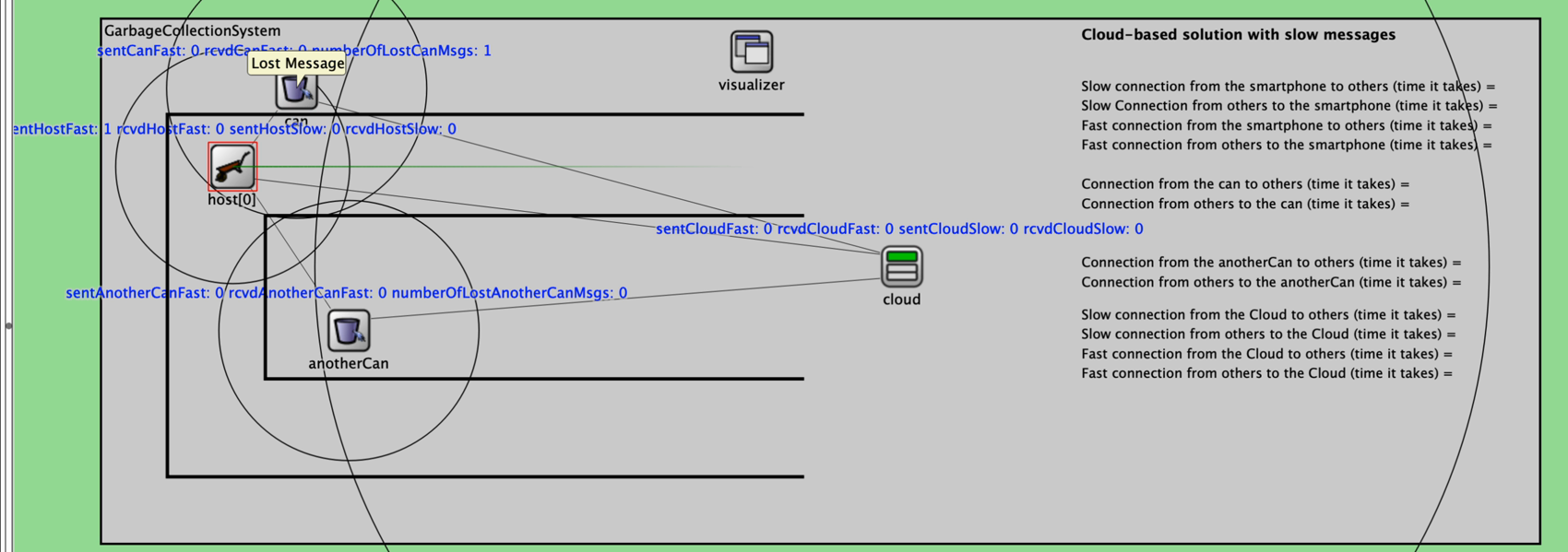
numberOfLostCanMsgs climbs to 3 before the can answers.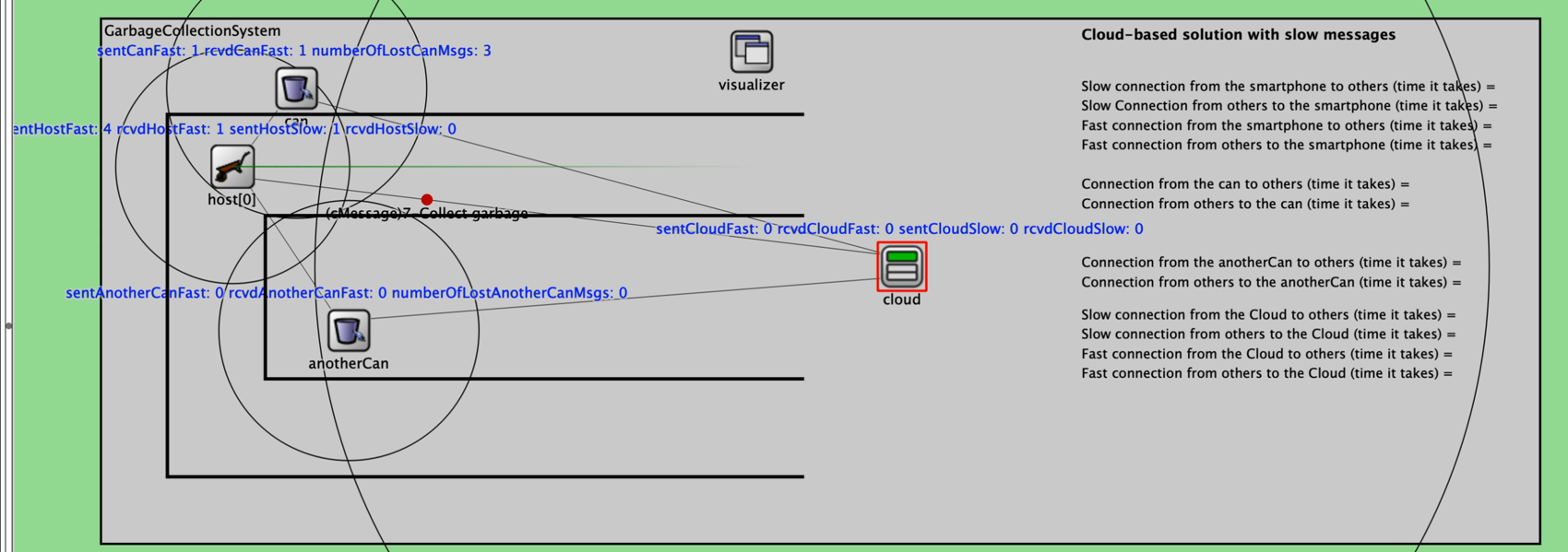
Design choices
- A shared
NodeBaseclass handles creating, sending and counting messages, so the smartphone, cans and cloud only contain their own logic. - Link parameters are based on real technologies and justified in the report:
| Link | Technology | Data rate | Delay |
|---|---|---|---|
| Smartphone ↔ cans | Wi-Fi 802.11g | 54 Mbit/s | 5 ms |
| Smartphone ↔ cloud | 4G/LTE and the internet to a data centre | 10 Mbit/s | 75 ms |
| Cans ↔ cloud | Street-level fiber | 1 Gbit/s | 10 ms |
- The simulation uses plain messages (red dots, like the reference videos) rather than packets. OMNeT++ only applies the data rate to packets, so
NodeBasecalculates the transmission time (size divided by data rate) itself and sends the message that much later, and the channel adds its delay on top. - Questions, answers and OK messages are 64 bytes. A collect request also carries the can’s id, position and fill level, so it is 128 bytes.
Results
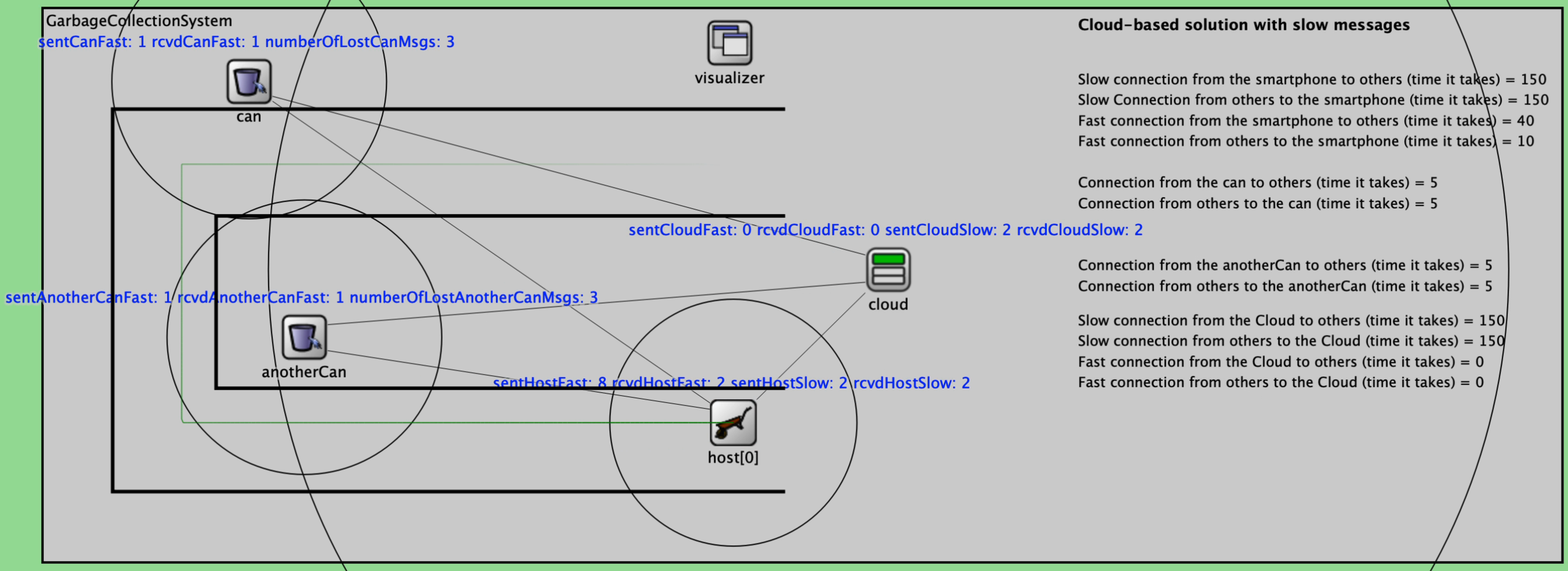
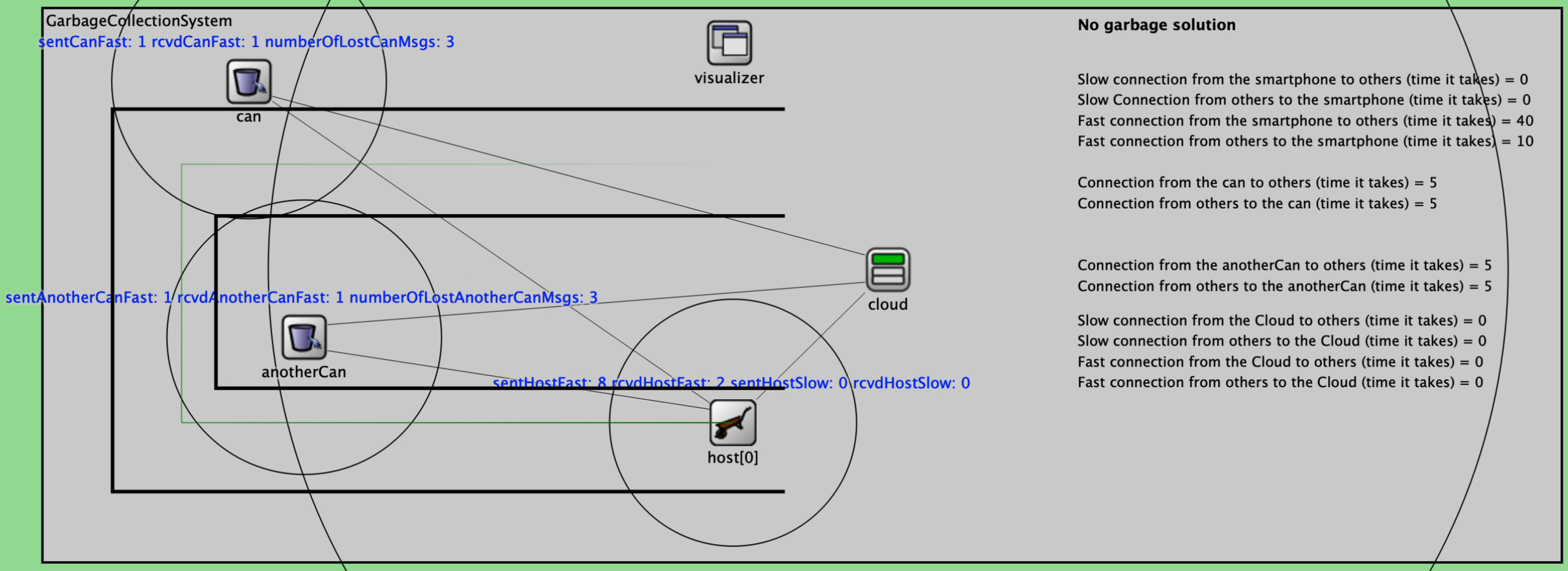
| Cloud-based | Fog-based | No garbage | |
|---|---|---|---|
| Messages sent | 14 | 14 | 10 |
| Messages on the slow link | 4 | 0 | 0 |
| Total time on links (sending) | 350.4 ms | 90.1 ms | 50.1 ms |
| Total time on links (receiving) | 320.3 ms | 60.0 ms | 20.0 ms |
Both garbage scenarios send the same number of messages. The difference is which links they use. The fog-based design spent about 3.9 times less time on the network when sending and about 5.3 times less when receiving. From the point of view of one full can, the cloud knew about it after 10 ms in the fog design and after 80 ms in the cloud design, and the OK came back after 20 ms instead of 155 ms.
The real bottleneck, and how to fix it
The most useful finding was that the link delays were not the real bottleneck. An answer arrives after about 10 ms, but the smartphone waits a full second before asking again, so the three lost questions cost 3 seconds per can, far more than all the link delays combined. The report proposes:
- An adaptive timeout based on the measured round-trip time, for example 50 ms, which cuts the waiting per can from 3 s to about 0.16 s.
- Push instead of poll: in the fog design the cans could report as soon as their sensor says they are full, so the questions and answers disappear and the cloud can plan a route that skips empty cans.
- Batching over the slow link: one request for both cans halves the LTE messages and saves about 150 ms.
- 5G with an edge server at the base station, which would cut the mobile delay from 75 ms to about 10 ms.
- Fewer losses, for example by stopping closer to the can or using a radio with frequency hopping such as Bluetooth Low Energy.
Paper presentation: Fogify, A Fog Computing Emulation Framework
Presented 21 October 2026 to the professors and students of IN5700/IN9700, together with a fellow student. Paper: M. Symeonides, Z. Georgiou, D. Trihinas, G. Pallis and M. D. Dikaiakos, “Fogify: A Fog Computing Emulation Framework”, IEEE/ACM Symposium on Edge Computing (SEC) 2020, pp. 42–54.
The presentation was split in two halves. The first half covers why fog applications are hard to build and test, where existing tools fall short, and how Fogify is designed: its architecture, how a fog topology is modelled, and how faults and changes are injected while the system runs. The second half covers the implementation, how realistic the emulation is compared with real hardware, and a case study with a taxi fleet. The figures below are taken from the paper, as they were used on the slides. Click any figure to see it in full size.
At a glance
- What: Fogify is an emulator for fog computing. It lets you run a real fog application on a laptop or a cluster, as if it ran on real fog hardware and real networks.
- Why: buying, configuring and testing real fog devices is slow and expensive, and existing simulators never run the real application.
- How: every emulated fog node is a Docker container. The topology is described as an extension of Docker Compose, and CPU, memory and network quality are throttled to match the device being emulated.
- Key result: the emulation stays within 3–8 % of a real setup, and existing applications run without code changes.
The problem: the fog continuum
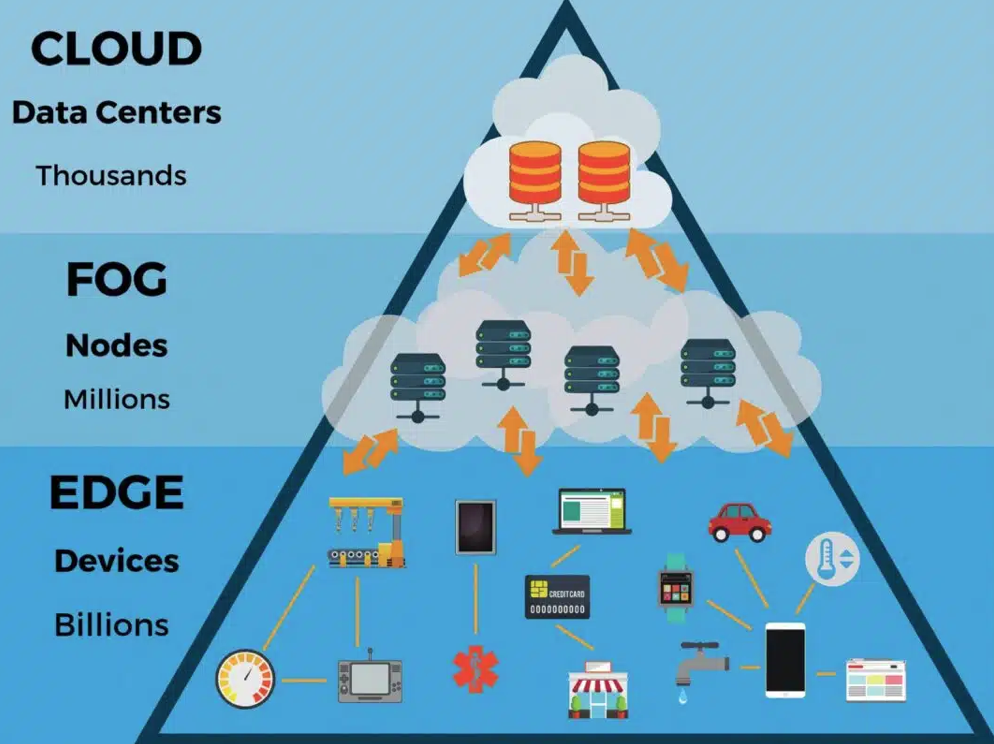
Sensing devices such as drones, cars and cameras produce a continuous stream of data. A single video surveillance sensor produces around 6 Mbit/s, which adds up to roughly 500 GB in one week. Sending all of it to the cloud is expensive and slow: the cloud has, in theory, unlimited resources, but it is physically far away, so every trip costs time. Fog nodes such as gateways, small board computers and MEC (multi-access edge computing) nodes sit in between, organised in a hierarchy.
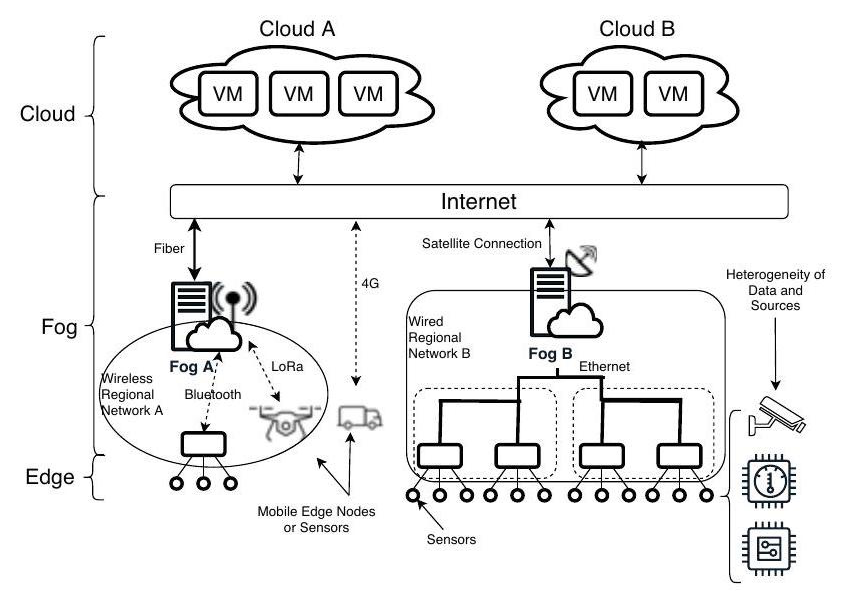
This is what makes fog applications hard to build and test:
- Hardware is costly to evaluate. A fog device can be anything from a Raspberry Pi 3 B+ at about 35 USD to a Cisco 800 Series router at about 2 000 USD, and no single device is best for every case. The same investigation is needed for every candidate before a line of application code is written.
- Manual configuration does not scale. Setting up every physical or virtual device by hand takes a long time once there are more than a few nodes.
- The network is heterogeneous. Bluetooth, Zigbee, LoRa and Wi-Fi all behave completely differently.
- Availability is hard to predict, even in a stable data centre.
The gap in existing tools
| Tool family | Examples | Limitation |
|---|---|---|
| Cloud and fog simulators | CloudSim, iFogSim, EdgeCloudSim | Only simulate. The real application never runs, and network problems and energy use are ignored |
| Fog emulators | FogBed, EmuFog, EmuEdge, MockFog | Inherit the restrictions of the network emulators they build on, and are often limited to a single host |
No existing framework combined real-time monitoring with reproducible, dynamic “what if” scenarios. Fogify’s goal is to close that gap with a container-based emulator.
Design objectives
- Resource heterogeneity: emulate different types of hardware.
- Network heterogeneity: control latency, bandwidth and error rate.
- Controllable faults: inject failures while the system is running.
- Any-scale experimentation: from a single laptop up to a whole cluster.
- Monitoring: collect data about what is actually happening.
- Rapid deployment: developers should not have to change their existing application code.
The overall goal is that users can emulate the key aspects of a fog environment with minimum effort.
The architecture
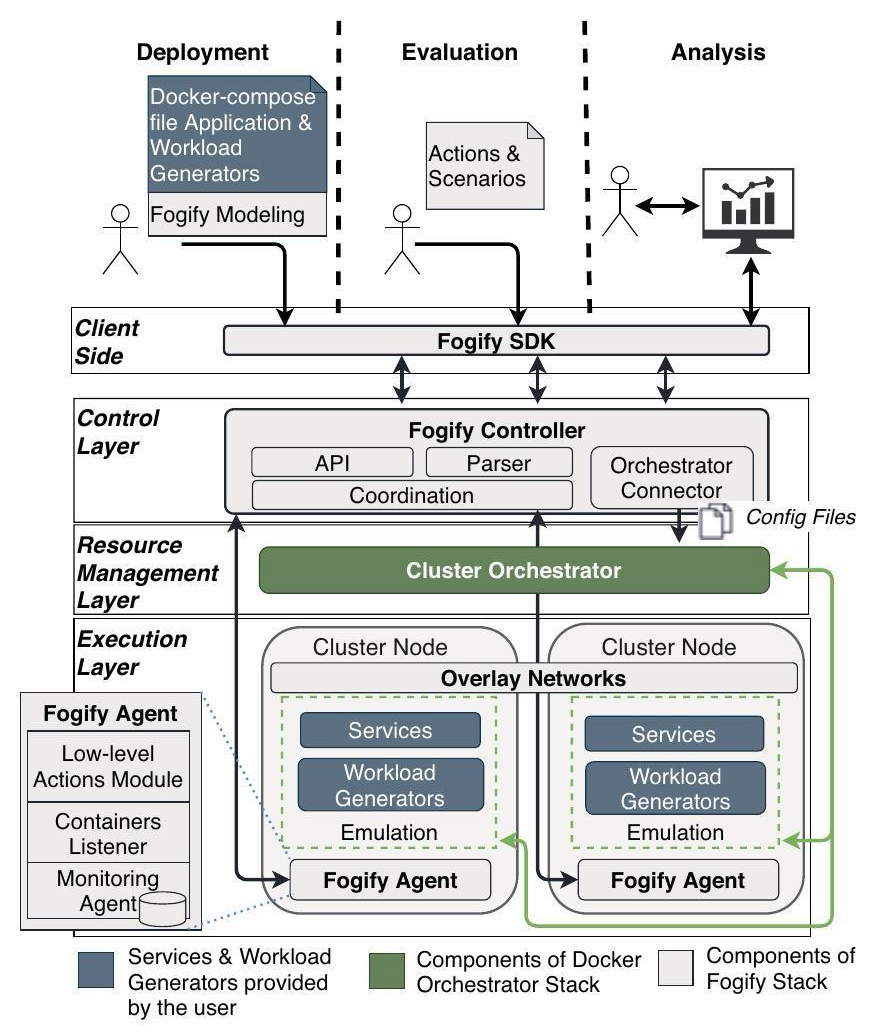
- Client side, the Fogify SDK: used to model a topology, deploy it and submit new actions to it.
- Control layer, the Fogify Controller: validates the submitted description and coordinates the whole deployment.
- Resource management layer, a cluster orchestrator: Docker Swarm in the prototype, which places the containers on the cluster.
- Execution layer, a Fogify Agent on every cluster node: a lightweight process that handles requests, listens for updates and monitors performance.
Modelling a fog topology
The model is written as an extension of Docker Compose, with a new section called x-fogify on top of the usual specification. It is built from three kinds of templates:
- Service template: one containerised application component, such as a business-logic service.
- Node template: the hardware profile of a physical or virtual fog device, with processor, memory and disk.
- Network template: a mesh link between nodes together with its default quality of service.
A blueprint combines a node, a service, a set of networks, a number of replicas and a label into one reusable building block. The same templates can be combined into different blueprints to build more complex topologies, and a blueprint can override the network quality for a whole network or for one specific link.
The running example is a smart transportation scenario. Each vehicle carries sensors for tire pressure, brakes, road condition and GPS position, and streams the data to the nearest regional MEC node. The MEC node analyses the data locally, so it can warn nearby drivers about incidents or congestion almost immediately, and forwards higher-level insights to the cloud for global analytics and for training machine learning models.
Making it dynamic: runtime actions and what-if scenarios
A fog system is never static, so Fogify can change the emulated environment while the application is running:
- Scaling action: adds or removes running instances, or temporarily changes how much capacity a node has.
- Network action: simulates connectivity going wrong, such as an ad hoc fault, interference or an attack.
- Stress action: puts extra workload pressure on a node that is already running.
- Scenario: a sequence of these actions scheduled over time and written in YAML, which makes the whole experiment easy to repeat.
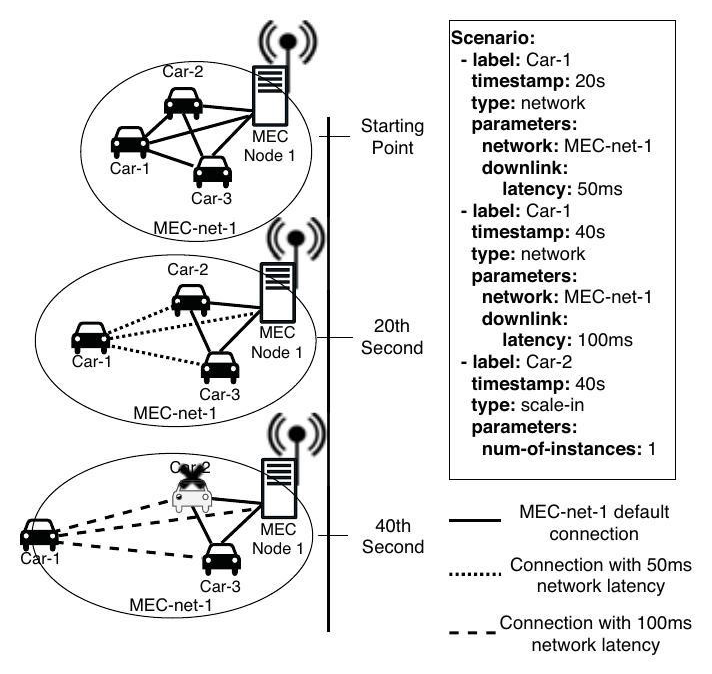
Implementation and evaluation
- SDK and API: a Python SDK on top of a REST API is used to deploy, run actions and scenarios, and pull monitoring data.
- CPU emulation: each emulated fog node is one Docker container. Fogify uses a metric called CCR (cores × clock speed), and the node’s CPU share is its CCR divided by the host’s CCR, enforced as a cgroup CPU quota. A Raspberry Pi (4 × 1.4 GHz) on a 16 × 2.4 GHz host gets about 15 % of the host.
- Network shaping: the network inside a cluster is far too fast to be realistic, so Fogify slows it down on purpose, using VXLAN tunnels, network namespaces and Linux traffic control.
- Monitoring with the sidecar pattern: monitoring runs next to the service rather than inside it, so CPU, memory and network data are collected without changing the application code.
- Realism: a real testbed (a Raspberry Pi 3, a laptop on Wi-Fi, an Azure VM in London and an AWS VM in Paris) was rebuilt in Fogify, and the same compute, network and data-processing tests were run on both. The emulation stayed within 3–8 % of the real setup.
- Case study, a geo-distributed taxi fleet: the smart transportation scenario with real data from 44 million New York taxi trips, five city regions with their own MEC node, and suburbs that go straight to the cloud (100 ms instead of 15 ms). It needed no code changes and less than 30 % extra configuration. Four what-if scenarios were tested: pricing models, profiling (a taxi moving from a suburb into a region used 56 % less memory and 36 % less CPU), network uncertainty (MEC delay of 2 s, then 20 s, then the MEC removed so the taxis fall back to the cloud), and scaling (a marathon moves taxis between regions, a new MEC node is added and the CPU load drops).
Conclusion
Fogify lets developers model, deploy and test fog applications on a laptop or a cluster instead of buying and configuring real devices. Because it builds on Docker Compose, existing applications run unchanged, and network failures, scaling and changing workloads are easy to experiment with. The open question the authors leave for future work is scale: with very large topologies, the central controller may become the bottleneck as the number of agents and actions grows.
What I took from it for my own work: it is the testing approach I want for the fog layer of Zero-Trust Continuum, where access decisions have to keep working when a link gets slow or is cut off. Being able to replay the same fault scenario from a YAML file is exactly what is needed to compare design choices fairly.
Individual project: FogCloudProject
Status: completed. Mandatory individual assignment, built in OMNeT++ 6.4 with C++.
A computer and a cloud node exchange messages over 100 ms links, and the point is to handle message loss with a timer. I drew the sequence diagram below from the code.
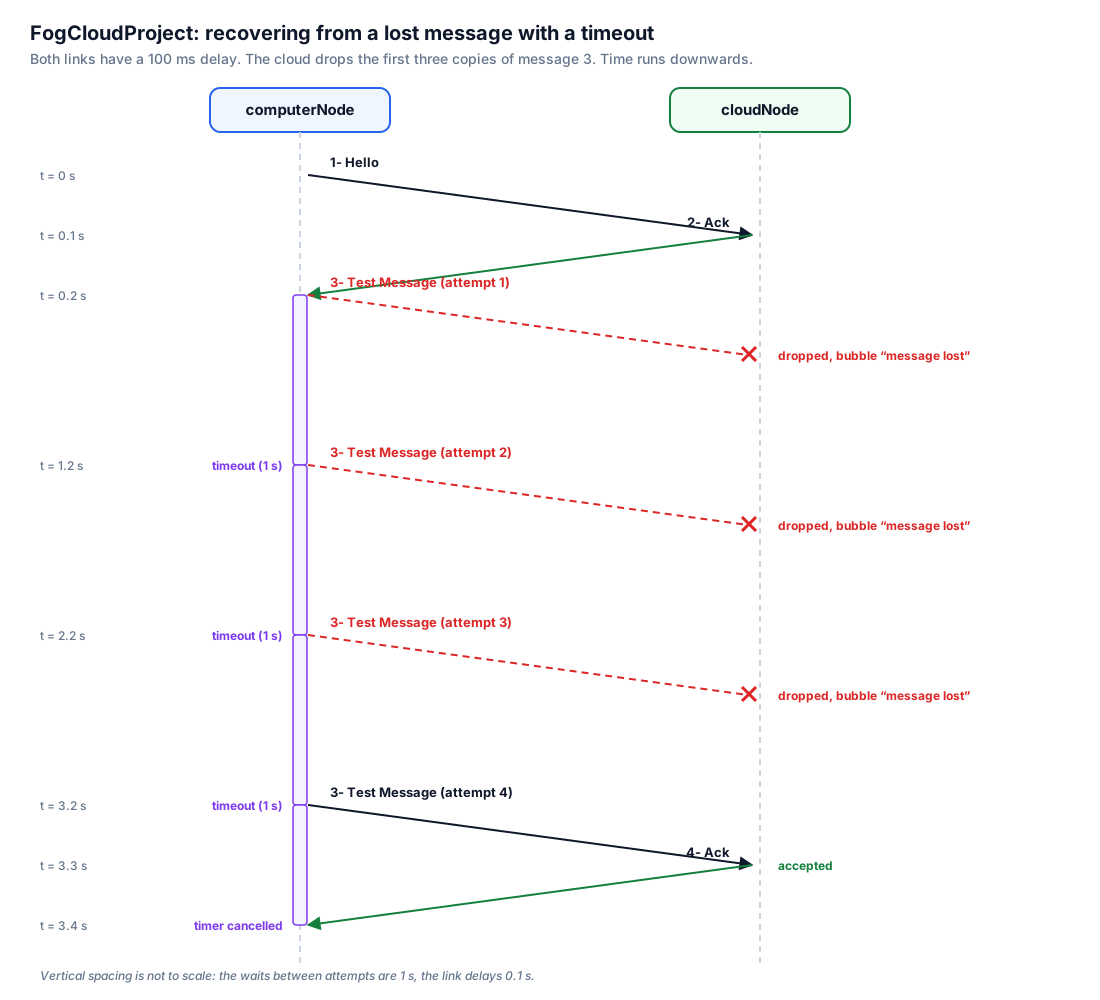
- The computer sends message 1 (Hello), and the cloud answers with message 2 (ACK).
- The computer then sends message 3 (a test message) and starts a 1-second retransmission timer as a self-message.
- The cloud deliberately drops the first three copies of message 3 and shows a “message lost” bubble in the simulation.
- Each time the timer fires without an ACK, the computer resends message 3 and re-arms the timer.
- The fourth copy is accepted, the cloud answers with message 4 (ACK), and the computer cancels and deletes the timer.
The group project above uses the same idea, a self-scheduled timeout followed by a retransmission, to recover from the lost questions to the garbage cans.
Tutorial: the OMNeT++ TicToc tutorial
Completed. I worked through the official TicToc tutorial from the OMNeT++ documentation, all 18 steps, to learn the simulator before the projects.
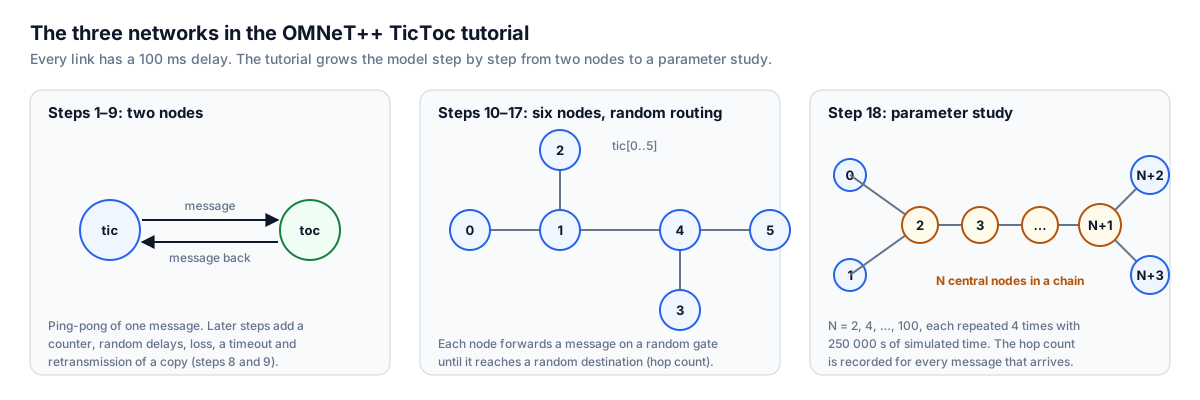
The tutorial builds one model step by step, and each step adds one OMNeT++ concept. The diagram shows the three networks it uses.
| Steps | What the step adds |
|---|---|
| 1–6 | Two modules passing one message back and forth, then icons, logging, state variables, parameters, NED inheritance and processing delay with self-messages |
| 7–9 | Random delays and random loss, then a timeout and retransmission of a copy: a stop-and-wait protocol |
| 10–13 | A network of six nodes with vector gates, channels and bidirectional links, random routing and a custom message class with a hop count |
| 14–17 | Statistics: counters on the canvas, vectors and histograms, signals with @statistic, and canvas figures |
| 18 | A parameter study over network size, with repeated runs |
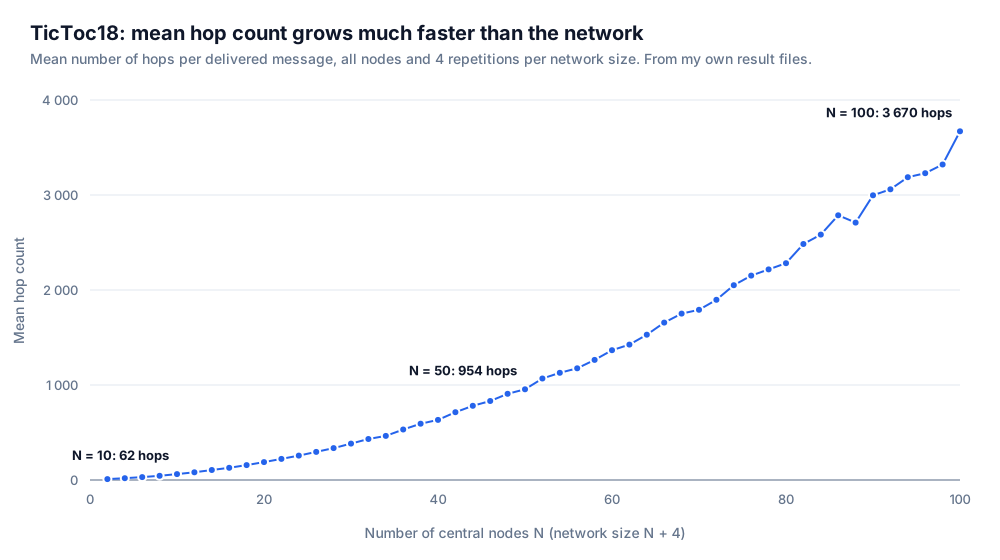
Messages are routed on a random gate, so each message does a random walk along the chain. The hop count grows roughly with the square of the network size, from about 62 hops at N = 10 to 3 670 at N = 100. Random routing is fine for a tutorial, but it does not scale.
The repository also holds the queueing, source-sink and Ethernet models I built while learning OMNeT++ and INET.
Repositories
| Work | Repository |
|---|---|
| Group project: smart garbage collection | group10-FC-2026 (private while the course runs) |
| Paper presentation: Fogify | Fog—and-Cloud-Computing (slides, private while the course runs) |
| Individual project, TicToc tutorial and labs | Fog—and-Cloud-Computing (private while the course runs) |
The reports, code, slides and simulation videos are available on request.